Reusable Include and Exclude Groups
Problem:
You are running a longitudinal study and have identified 1000 workers who you want to allow to take your second phase studies. How do you easily group those workers for easy access.
Or you want to exclude certain workers from taking a number of your studies and wish to group them for easy exclusion in future studies. How can you do that?
Solution:
Use the TurkPrime Worker Groups feature available in the Manage Workers menu. This allows you to create reusable worker groups for either inclusion or inclusion in studies. You simply select whether this group is an include or exclude group, give it a clear name and specify the workers in the group.
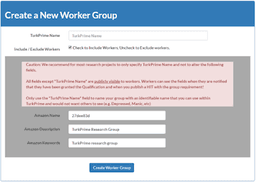
Workers will not know why they were targeted for inclusion or exclusion since the MTurk Qualification name used is a random sequence of characters. The TurkPrime Group Name will not be visible to Workers. This is important so that you can run blind studies (i.e. the workers who are specified for inclusion will know they were targeted because they are exhibiting a certain personality, for example).
When you design your study, and specify Worker requirements, add this group to the worker requirements and all workers in that group will be wither included or excluded, as needed.