Connect for Participants - Earn Money Taking Surveys Online
Connect for Participants
Put Your Perspective
to Work
Join studies, share your input, and help shape research, technology, and everyday experiences—while getting rewarded for your time.
Consumer Preferences Survey
Health & Wellness Opinions
Social Media Usage Poll
Financial Decision Making
Online Learning Feedback
Product Feedback Session
Political Attitudes Survey
Shopping Habits Study
Environmental Attitudes
Memory & Cognition Test
Workplace Culture Study
AI & Technology Perceptions
Consumer Preferences Survey
Health & Wellness Opinions
Social Media Usage Poll
Financial Decision Making
Online Learning Feedback
Product Feedback Session
Political Attitudes Survey
Shopping Habits Study
Environmental Attitudes
Memory & Cognition Test
Workplace Culture Study
AI & Technology Perceptions
Consumer Preferences Survey
Health & Wellness Opinions
Social Media Usage Poll
Financial Decision Making
Online Learning Feedback
Product Feedback Session
Political Attitudes Survey
Shopping Habits Study
Environmental Attitudes
Memory & Cognition Test
Workplace Culture Study
AI & Technology Perceptions
How to Earn Easy Money Online
With Connect Surveys
As a participant, you can earn extra cash online for sharing your opinions and participating in surveys and online jobs that further our understanding of people's thoughts, feelings, and behavior! Start making money in minutes.
Join Studies That Matter
Take part in research on real-world topics, from everyday decisions to emerging trends. Your responses help teams better understand people like you.
Share Your Perspective
Answer questions, give feedback, and express your opinions. Every response contributes to insights that drive smarter decisions.
Shape Technology and AI
Help improve how AI systems and digital tools work. Your input makes them more accurate, fair, and useful in real-world situations.
Influence What Comes Next
Your feedback helps guide the development of new products, features, and experiences used by people every day.
How Does Connect Work?
Connect brings together researchers and people who can participate in studies. We strive to create a space that makes contributing to research fun and rewarding.
Friendly Dashboard
From the dashboard you can see projects you're eligible to participate in and quickly search and sort those you're interested in.
Payout Center
The payout center tracks your earnings and shows how much you earn on a daily basis. You can also see how much is in your wallet and cash out your earnings.
Internal Messaging
The message center allows you to send and receive messages within the Connect ecosystem. No need for outside emails.
Hello,
Thank you for signing up on Connect! We appreciate your time and interest in the platform. We're writing to update you on the status of the site...
Participant Feedback
What Connect
Participants
Are Saying
Connect participants have spoken about their experiences with Connect surveys. Here’s what they’re saying:
I would describe Connect as the platform where your voice actually carries weight. In terms of study platforms, Connect is in a league of its own. I’ve participated in a wide variety of research studies, and the experience has been consistently engaging, rewarding, and—most importantly—purposeful.
Your platform is called Connect. I just want you to know that it does more than just connect participants and researchers in a technical and logistical way. It has the ability to connect minds, spirits and emotions, and has the capacity to change lives for the better. I know it did for me…Thank you so much CloudResearch. I am so honored to be here and am a proud participant on this platform, for life.
I’ve worked with Connect on and off for a couple of years now, usually picking it up more when I have the time or need some extra money. I’ve always been satisfied with my experience. There are usually plenty of opportunities to participate in surveys, and I’ve noticed that when I’m more active, I tend to receive more of them, including higher-paying options. The more I participate, the better the quality and value of the surveys I’m offered… I’m a strong supporter and recommender of Connect for anyone looking to earn extra money in a flexible way.
In a world where data is king, Cloudresearch Connect offers a way to benefit from our online activities. It is a win-win scenario – I earn money while participating in a larger data ecosystem. Continue what you do as you are loved by me and many people.

I love Connect because the surveys are interesting and the incentive to do them is very good compared to other survey apps.

I ❤️ cloudresearch! It has helped me on more than one occasion. It has helped me pay my phone bill, buy gas, it has also helped me buy food when I literally had no other way! They make it so easy to get paid!

I have been part of Connect for quite some time and it is amazing! Each day they have multiple studies that are quick, easy, and fun. Before I know it I have earned enough to treat my family to something nice! Do yourself a favor and join today!

I love all the great surveys with higher pay outs and the fact that my cashouts are faster with PayPal.

Cloud Connect really cares about the people who participate in their studies because they allow us to rate and review each group who are running the studies and no other platform lets us do that. I've been with Connect since the beginning. Love them!

I just love being a part of Cloud and having the flexibility to choose the projects I work on. Great company, great people and I am so lucky to be a part of them. Thank you!

I can work on my own time, make a difference by sharing my opinion & have fun doing it. Connect really is just that … fun to use!

Great site and has a lot of interesting studies. Would recommend to anyone who has extra time. I think the coolest moment was how quickly I saw studies showing up and how easy the site is to use.

This has been a great way for me to make some money at my pace. They are fair, don't take advantage of me as some research platforms did and the work is also interesting.
I love the multiple variety of studies Connect offers. I also adore the payment options and how quick the payouts are! This truly is a Wonderful Platform to be a part of!

Frequently Asked Questions
Life happens and details about you may change. Maybe you switch jobs, take up a new hobby, get a raise at work, or start dating someone new. When these or other changes happen, you may want to update information in the "About You" section.
As of right now, you will need to email us at connect-support@cloudresearch.com to make any changes. Our support team can unlock qualifications and give you the chance to update your information. We periodically ask you to confirm that your core demographic information has not changed. If something has changed, you can update the information on your account.
We want Connect to provide the highest quality data on the internet. By verifying your identity, you help us ensure that the people participating in studies are who they say they are and that in turn increases researchers' confidence in the quality of data they gather.
Confirming your identity also ensures you will be prioritized for project notifications and gives you access to certain Connect features such as the ability to cash out your earnings as an Amazon gift card.
Why was my ID verification rejected?
It's difficult to say exactly. Your government ID may be expired, your documents may not have matched the photo you uploaded, the lighting or other conditions may have been too poor to detect a match, or several other possibilities. Be sure to follow the Best Practices when confirming your ID and know you can try using different forms of physical identification if your first attempt fails. Please contact us for more support.
Can I get verified using a different method?
Stripe Identity is currently the only form of identity verification Connect offers. Please note that it is required of all participants to complete verification in order to continue taking studies on Connect.
How can I access or delete my verification data?
You can request that your data be deleted by contacting us. When making your request, please include your Connect ID. Our team will work to complete your request quickly.
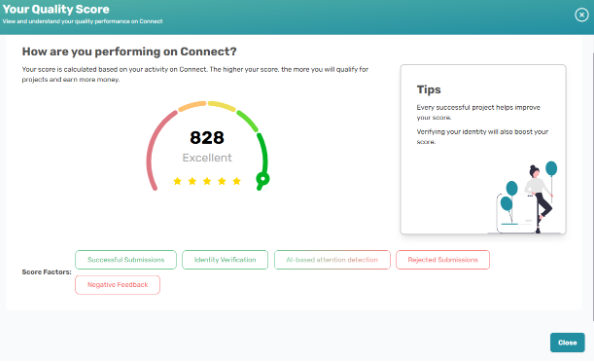
Quality scores are like credit scores. Participants get a score out of 850 based on their history of completing projects on Connect. The higher the score, the better. Maintaining a high-quality score prioritizes you for more Connect projects.
How Can I View my Quality Score?
To view your quality score, sign into Connect and select your star rating from the top right corner.
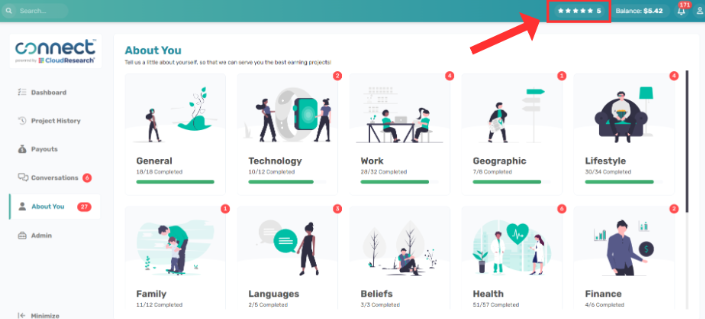
Your score will appear with some tips on how to increase your score and factors that go into calculating your score.
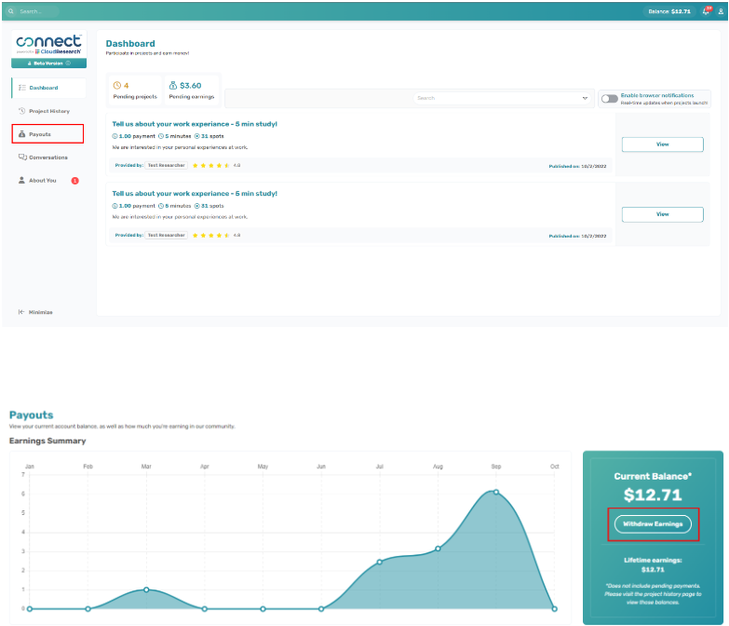
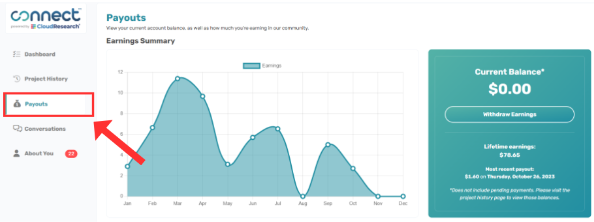
Go to the Payouts Center. In the Payouts Center you will see how much money is in your account and an option to "Withdraw Earnings." As long as you have funds in your account balance you can cash out.
You will be able to transfer your balance via PayPal, Bank Transfers, or Amazon Gift Cards.
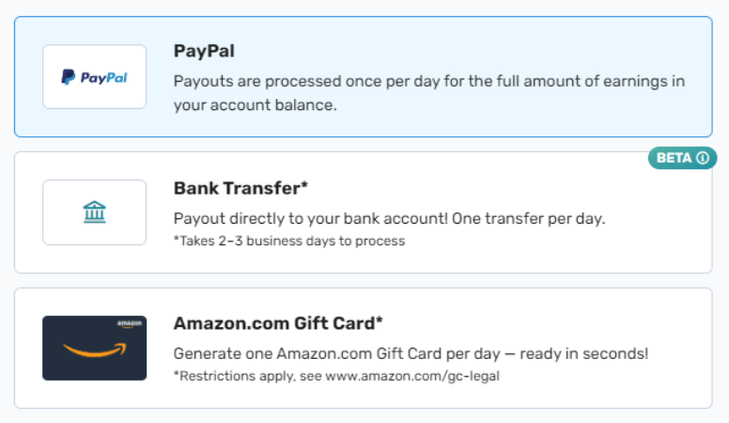
Transfer Via PayPal
After you confirm that you want to transfer money, your full balance will be moved to PayPal. Transactions are processed once per day.
Note: If you have not yet linked your PayPal account, you will have to do so before you can withdraw your earnings. See the article titled "Linking Connect to PayPal" for more information.
There is a $5 balance minimum to cash out to a PayPal. All participants have a maximum cash out amount of $100 when transferring to PayPal.
Transfer Via Bank Transfer
Once you select this option, you will be redirected to the bank onboarding process. You can then choose the amount of money (up to your full balance) that you would like to transfer to your bank account. Please note that you are only allowed to transfer once per day. For additional details, please click here.
There is a $25 balance minimum to cash out via bank transfer. All participants have a maximum cash out amount of $250 when transferring funds to their bank.
Bank transfers are now available to all participants.
Transfer Via Amazon Gift Cards
Once you select this option, you can then choose the amount of money (up to your full balance) that you would like to create an Amazon Gift Card for. Please note that you are only allowed to create a gift card once per day.
There is a NO balance minimum to cash out to an Amazon gift card. All participants have a max cash out amount of $100 when cashing out via Amazon gift card.
You will be required to verify your identity in order to transfer funds via Amazon Gift Cards. It is currently disabled, but will be reinstated in the future.
I forgot to Copy my Amazon Gift Card Code. How Can I Get the Code?
1. Navigate to your payouts section.
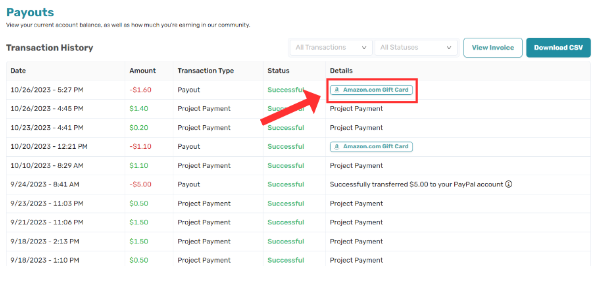
2. Scroll to the Transaction History area and locate the payout to an Amazon gift card you would like to get the gift card code for. Select the "Amazon.com Gift Card" button in the Details.
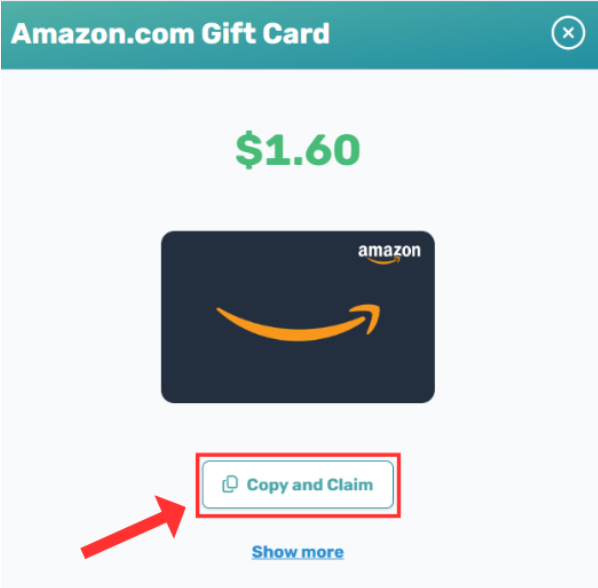
3. The following will appear which allows you to copy the code into your Amazon account by selecting "Copy and Claim". You may also select "Show More" which will give you the gift card code and more details on how to redeem in your Amazon account.
Can I Change a Cash Out Once it is Made?
The simple answer is no. Once a cash out is made, you cannot cancel it and change to a different payout method. For example, if you cashed out to an Amazon gift card, we cannot cancel the gift card code and add the funds back to your Connect account so you can cash out to your PayPal or bank account.
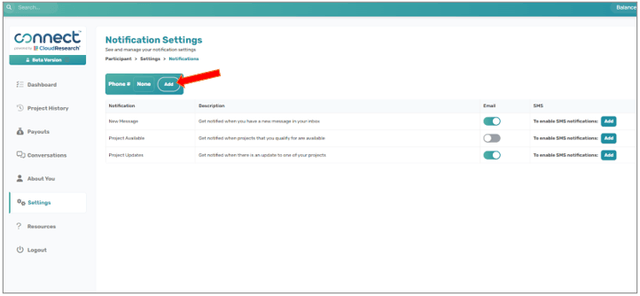
Navigate to "Settings" via the sidebar menu.
Within Settings, click on "Manage Notifications."
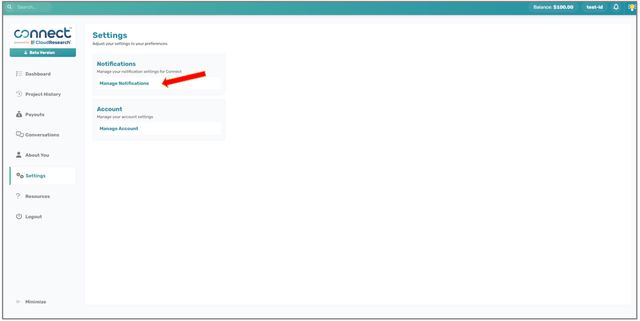
On the Notification Settings page, you can toggle the switch under the Email column to 'on' for whichever category you would like to receive email messages for
In order to receive SMS messages, follow these additional steps:
Click "Add" in the "Phone #" display
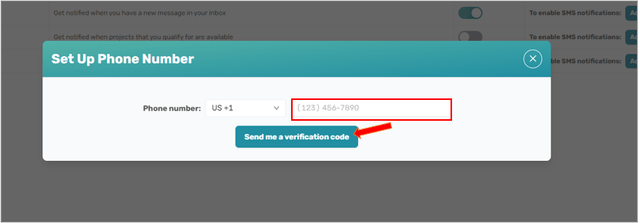
Enter your phone number and click "Send me a verification code"
Once you have received an SMS message with the code, enter that code into the input and click "Verify Number"

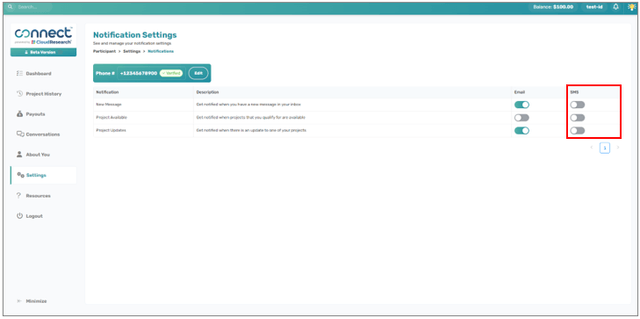
Go back and toggle the switches in the SMS column to 'on'


What is Light Mode and Dark Mode? Light mode and dark mode are display settings for user interfaces, such as a smartphone or computer. When a display is presented in light mode, dark text shows up against a light screen. In dark mode, the opposite occurs: light text is presented against a dark screen.
While there are several mixed opinions and scientific findings concerning the benefits of dark mode, advocates say it is easier on the eyes, better for low light settings, and consumes less electricity. We're agnostic about the benefits of dark mode but we've programmed it into Connect all the same.
Visit our knowledgebase for more information about using Connect.
Ready to start earning?
Join thousands of participants who earn cash by sharing their opinions in research studies.